

Keying Schedule
A keying schedule is the central record of a locking system: a matrix showing which keys or credentials open which doors, used to specify, install and manage every lock and access permission in a building. It's created when a locking system is first ordered and then maintained by whoever manages the building day to day. This glossary entry explains what a keying schedule looks like, how it's created and updated, and why a digital locking system makes it far easier to manage than a traditional mechanical one.
Inhalt:
▶ What is a keying schedule?
In short: a keying schedule is a matrix showing which key or credential opens which door, and it's the central reference document for specifying, installing and managing a locking system.
A keying schedule provides an overview of the cylinders and keys used within a locking system. It shows which keys operate which cylinders and, conversely, which cylinders can be opened by each key.
The keying schedule therefore serves as the central record of the locking system. For a mechanical master-key system, it also forms an essential part of specifying and ordering the system.
Each keying schedule is created individually to reflect the requirements of the particular building. Wherever possible, doors and locking points should therefore be given clear, meaningful descriptions from the outset, for example "Kitchen" rather than "Room 1".
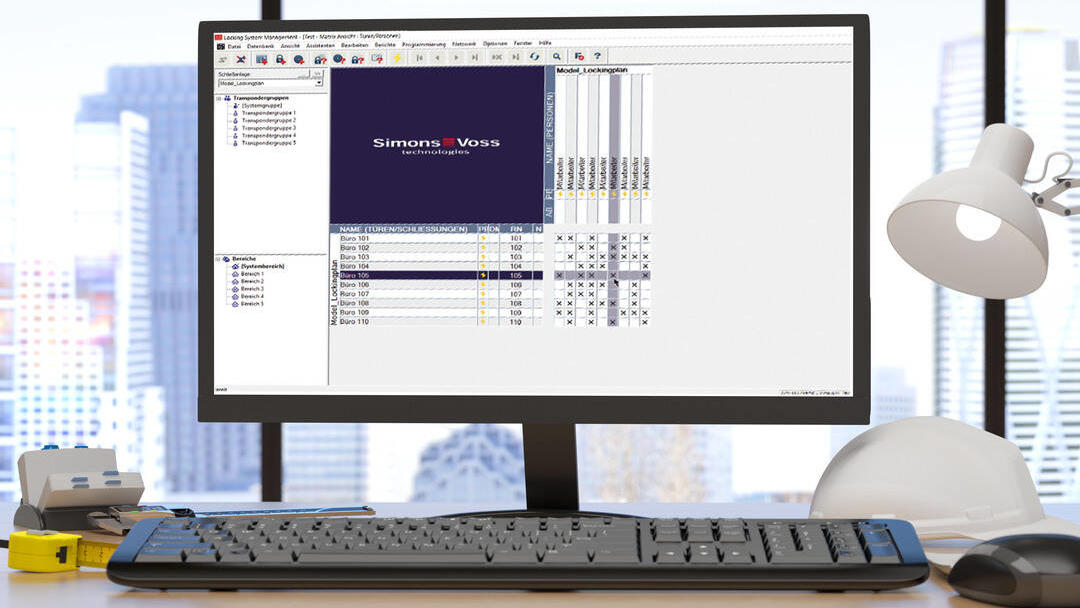
A keying schedule is typically presented as a matrix showing doors or cylinders on one axis and keys on the other. The matrix identifies which key is authorised to operate each door. In larger master-keyed systems, the hierarchy will usually include a grand master key or another high-level master key with extensive access permissions, of the kind used in a digital master key system.
Additional lock or cylinder functions can also be recorded in the schedule, including features such as drill protection or emergency and override functions.
Simpler keying schedules may be maintained by the Facility Manager on paper or in a spreadsheet. For larger buildings or estates, dedicated locking-system management software is generally used to manage the schedule and the associated access structure.
Locking-system manufacturers and specialist dealers will often provide templates for developing a keying schedule. SimonsVoss uses its own easy-to-understand Locking System Management software, which enables locking points and access permissions to be administered digitally.
▶ Creating and managing a keying schedule
In short: the keying schedule is normally drawn up when the locking system is first ordered, ideally with input from the future building administrator, and responsibility for it passes to the operator once the system is installed.
The keying schedule is normally created when the locking system is first specified and ordered. This ensures that the system can be tailored to the layout, use and security requirements of the individual building.
It is therefore advisable for the manufacturer or specialist dealer to develop the initial keying schedule together with the future system owner or primary administrator.
The amount of detail available at this stage depends on the project.
When a locking system is being planned for a building that is still under construction, the final use of individual rooms may not yet have been determined. This can make it more difficult to define precise locking points and access groups.
Where an existing locking system is being replaced, the requirements can usually be mapped more accurately because room functions, user groups and existing access arrangements are already known. Templates and sample schedules can also be used to begin planning at an early stage.
Once the locking system has been installed, responsibility for managing the keying schedule normally passes to the organisation operating the building.
In a multi-occupancy residential property, for example, responsibility may lie with a building manager, caretaker or Facility Manager. They need an overview of which occupants are assigned to which residential units and how many keys have been issued to each of them.
The same principle applies in commercial organisations. A designated person should be responsible for keeping track of which employees hold which keys and ensuring that everyone has the access permissions appropriate to their role.
▶ Changes to the keying schedule and access permissions
In short: updating a mechanical keying schedule, whether for a planned change or a lost key, can mean issuing new keys or rekeying affected cylinders, with cost and effort that scales with the size of the master-key system.
There are many reasons why a keying schedule may need to be changed or an individual's access permissions adjusted.
In a mechanical locking system, making such changes can be relatively complex. This applies both to planned changes, for example where an employee takes on additional responsibilities and needs access to more areas, and to unplanned events such as a lost key.
When access requirements change
Suppose an employee takes on additional responsibilities and therefore needs access to more rooms.
In a conventional mechanical locking system, the operating scope of an existing key cannot simply be extended after the key has been manufactured. Depending on the design of the master-key system, the user may therefore need to be issued with an additional key or the keying arrangement may need to be modified.
For Facility Management teams, this can result in additional key administration and an increasing number of physical keys in circulation.
When a key is lost
A lost key can present a significant security risk in a mechanical locking system because it cannot simply be electronically deactivated.
The appropriate response depends on which key has been lost and which locks it operates. In a large or complex master-key system, the loss of a high-level master key can affect a significant number of doors and may require affected cylinders to be rekeyed or replaced.
The resulting cost and administrative effort can be substantial. Our guide to tackling lost keys and unauthorised access looks at this problem in more detail, particularly for admin-heavy environments such as schools.
▶ Benefits of a keying schedule in a digital locking system
In short: in a digital locking system, the keying schedule stops being a fixed record and becomes a live tool, since permissions can be assigned, changed or revoked in software rather than being fixed to a physical key.
A digital locking system offers considerably greater flexibility when managing access permissions.
Unlike a conventional mechanical master-key system, the access structure is not permanently defined by the physical key. Permissions can be assigned, extended, revoked or changed retrospectively using the locking-system management software.
This means that an individual user's access permissions can be adapted as their responsibilities change.
The loss of a digital credential, such as a transponder or SmartCard, is also much easier to manage. The lost credential can be blocked within the system so that it can no longer be used for authorised access. A replacement credential can then be issued without having to replace the affected electronic locking devices. Our guide to digital key management covers this comparison with mechanical master-keying in more detail.
A digital keying schedule also enables more granular access management. Permissions can, for example, be limited to defined time periods so that they are valid only during a specified window, such as between 10am and 6pm.
Electronic credentials can also be assigned permissions for functions beyond door access. Depending on the system and application, these may include authorisation to operate machinery or other electronically controlled equipment.
Digital locking therefore transforms the traditional keying schedule from a static record of keys and cylinders into a flexible access-management tool.
FAQ
When should a keying schedule be created?
A keying schedule is normally created when the locking system is first specified and ordered, ideally developed together with the future system owner or administrator so the system reflects how the building will actually be used.
Who is responsible for managing a keying schedule?
Once the locking system is installed, responsibility normally passes to whoever operates the building, such as a building manager, caretaker or Facility Manager. In a commercial organisation, a designated person should keep track of which employees hold which keys or credentials.
What happens to a keying schedule if a master key is lost?
In a mechanical system, losing a high-level master key can affect a significant number of doors and may require the affected cylinders to be rekeyed or replaced, which can be costly. In a digital locking system, the lost credential can instead simply be blocked in the management software, with no need to replace hardware.
Can access permissions be time-limited in a keying schedule?
Yes, but only in a digital locking system. A digital keying schedule allows permissions to be restricted to a defined time window, for example so a credential only works between 10am and 6pm, which isn't possible with a purely mechanical key.
Do you have further questions about keying schedules?
SimonsVoss is a pioneer in electronic access control systems. Get in touch and we can identify the right solution for your security requirements and support you in creating and managing your individual keying schedule using our Locking System Management software.